I was getting the Invalid Action error when trying to open Microsoft CRM 4.0.
CrmWRPCTokenKey
CrmKey(Id:f2325117-8ab9-e011-9379-00155d009105, ScaleGroupId:00000000-0000-0000-0000-000000000000, KeyType:CrmWRPCTokenKey, Expired:True, ValidOn:07/29/2011 02:25:58, ExpiresOn:08/31/2011 02:25:58, CreatedOn:07/29/2011 02:25:58, CreatedBy:NT AUTHORITY\NETWORK SERVICE
CrmKeySetting(Id:a24534e8-f95d-4885-9b90-91894176bba3, KeyType:CrmWRPCTokenKey, KeyLength:128, KeyGenerationInterval:720, KeyTimeToLive:792, CryptoTimeToLive:72, Algorithm:HMACSHA256, ArchiveLength:1, Enabled:True, ActiveKeys:[ScaleGroupId=00000000-0000-0000-0000-000000000000,ActiveKeyId=f2325117-8ab9-e011-9379-00155d009105])
Fix:
Starting the Microsoft CRM Asynchronous Processing Service.
If the Crm Asynchronous service can NOT be started, restart the server or all related servers.
Monday, 5 September 2011

How to configure a server to belong to a domain? Cannot remote into a server in the Intergen VM environment.
How to configure a server to belong to a domain?
Cannot remote into a server in the Intergen VM environment.
* Change your IP4 Protocol settings of the LAN settings FROM

TO

* just moved the VM to temporary Workgroup then disable firewall so that you can still remote to the service after restart. Then restart the server and added it back to the domain. When re-joining server to the new domain you desire with the new domain name, in this case it is "wms".
To move the VM to workgroup
+ Go control panel -> System
+ Click on the "Change settings" link on the right of the screen.

+ Click on "Change..." on the System Properties window.
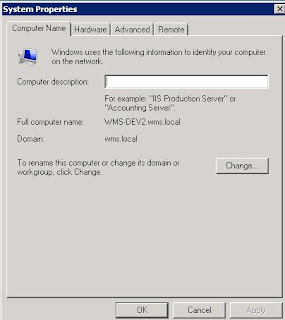
+ Select the "Workgroup" option on the "Computer Name/Domain Changes" window

* Then restart the server
* Then switch the vm from workgroup to the new domain with the same method above
You can check all the servers or nodes belong to the domain in the DNS Manager of the AD server
Cannot remote into a server in the Intergen VM environment.
* Change your IP4 Protocol settings of the LAN settings FROM

TO

* just moved the VM to temporary Workgroup then disable firewall so that you can still remote to the service after restart. Then restart the server and added it back to the domain. When re-joining server to the new domain you desire with the new domain name, in this case it is "wms".
To move the VM to workgroup
+ Go control panel -> System
+ Click on the "Change settings" link on the right of the screen.

+ Click on "Change..." on the System Properties window.

+ Select the "Workgroup" option on the "Computer Name/Domain Changes" window

* Then restart the server
* Then switch the vm from workgroup to the new domain with the same method above
You can check all the servers or nodes belong to the domain in the DNS Manager of the AD server

Sunday, 4 September 2011
Christmas travel plan with Erica, holiday plan, 2011
Destination options:
罗托鲁瓦(Rotorua)[Mud spa][Farm Tour - http://www.agrodome.co.nz]→汤加里罗国家公园(Tongariro National Park)→惠灵顿, Matamata, Tauranga[Golden beach],Napier(Wine tour)
Christchurch,→库克山国家公园(Mount Cook National Park)→蒂卡波(Tekapo)→瓦那卡(Wanaka)→箭镇(Arrow town)→皇后镇(Queenstown)—蒂阿瑙(Te Anau)[stay one day]→ Milford sound -> 丹尼丁(Dunedin)→阿卡罗阿(Akaroa - Akaroa is next to ChristChurch)
Travel plan:
Deluxe Lake Spa - http://www.polynesianspa.co.nz/polynesianspa/deluxe-lake-spa/
hawkes bay wine taste
http://www.hbscenictours.co.nz/wine_experience_tour.htm
http://www.hawkesbaynz.com/prinsys
http://www.baytours.co.nz/winerytours-option1.php
hawkes bay accommodation stay on the vineyard
http://www.clearviewestate.co.nz/accommodation/
http://www.tuki.co.nz/
http://www.blackbarn.com/property.asp?id=8 (Expensive)
Friday, 2 September 2011
Burnt exhaust valve in lawn mower engine; Lawn mower won't start
The most common cause being too much heat in the combustion chambers. The heat will melt slots in the valve face. Anything causing it to run hot, or hotter than designed, needs to be addressed.
In my case, that is not enough engine oil.
In my case, that is not enough engine oil.
Wednesday, 31 August 2011
Filtered Lookup Approaches in CRM 2011
http://gtcrm.wordpress.com/2011/03/22/filtered-lookup-approaches-in-crm-2011/
function GetCountryFromAccount() {
//Get the GUIDvalue of this Contact's Parent Account
var ParentAccount = Xrm.Page.data.entity.attributes.get("parentcustomerid");
if (ParentAccount.getValue() != null) {
var ParentAccountGUID = ParentAccount.getValue()[0].id;
}
// Read the CRM Context to determine the CRM URL
var serverUrl = Xrm.Page.context.getServerUrl()
// Specify the ODATA End Point and Entity Collection
var ODATA_ENDPOINT = "XRMServices/2011/OrganizationData.svc";
var ODATA_EntityCollection = "/AccountSet";
// Specify the ODATA Query
var ODATA_Query = "(guid\'" + ParentAccountGUID + "\')?$select=new_Country";
// Combine into the final URL
var ODATA_Final_url = serverUrl + ODATA_ENDPOINT + ODATA_EntityCollection + ODATA_Query;
//Calls the REST endpoint to retrieve the Country value of the Parent Account
$.ajax({
type: "GET",
contentType: "application/json; charset=utf-8",
datatype: "json",
url: ODATA_Final_url,
beforeSend: function (XMLHttpRequest) {
XMLHttpRequest.setRequestHeader("Accept", "application/json");
},
success: function (data, textStatus, XmlHttpRequest) {
//This function will trigger asynchronously if the Retrieve was successful
var CountryGUID = data.d.new_Country.Id;
if (CountryGUID == null) {
// country on acct is null, we won't bother filtering the view
return;
}
else {
// call function to add custom view
ChangeLookupView_State(CountryGUID);
}
},
error: function (XmlHttpRequest, textStatus, errorThrown) {
//This function will trigger asynchronously if the Retrieve returned an error
//Error encountered, we won't bother filtering the view
return;
}
});
}
function ChangeLookupView_State(CountryGUID) {
//Set parameters values needed for the creation of a new lookup view...
var viewId = Xrm.Page.data.entity.getId(); // Your new lookup views needs a unique id. It must be a GUID. Here I use the GUID of the current record.
var entityName = "new_state"; // The entity your new lookup view relates to
var viewDisplayName = "States for Account Country"; // A name for new lookup view
var viewIsDefault = true; // Whether your new lookup view should be the default view displayed in the lookup or not
//Define the Fetch XML query your new lookup view will use. You can create this via Advanced Find. You'll need to massage the syntax a little though
var fetchXml =
"" +
"" +
"
"
"
"
"" +
"
" " +
" " +
" ";
//Define the appearance of your new lookup view
var layoutXml =
"" +
"" + // id = the GUID field from your view that the lookup should return to the CRM form
" | " +
"
" +
" ";
//Add your new view to the Lookup's set of availabe views and make it the default view
Xrm.Page.getControl("new_statelookupid").addCustomView(viewId, entityName, viewDisplayName, fetchXml, layoutXml, viewIsDefault);
}
function GetCountryFromAccount() {
//Get the GUIDvalue of this Contact's Parent Account
var ParentAccount = Xrm.Page.data.entity.attributes.get("parentcustomerid");
if (ParentAccount.getValue() != null) {
var ParentAccountGUID = ParentAccount.getValue()[0].id;
}
// Read the CRM Context to determine the CRM URL
var serverUrl = Xrm.Page.context.getServerUrl()
// Specify the ODATA End Point and Entity Collection
var ODATA_ENDPOINT = "XRMServices/2011/OrganizationData.svc";
var ODATA_EntityCollection = "/AccountSet";
// Specify the ODATA Query
var ODATA_Query = "(guid\'" + ParentAccountGUID + "\')?$select=new_Country";
// Combine into the final URL
var ODATA_Final_url = serverUrl + ODATA_ENDPOINT + ODATA_EntityCollection + ODATA_Query;
//Calls the REST endpoint to retrieve the Country value of the Parent Account
$.ajax({
type: "GET",
contentType: "application/json; charset=utf-8",
datatype: "json",
url: ODATA_Final_url,
beforeSend: function (XMLHttpRequest) {
XMLHttpRequest.setRequestHeader("Accept", "application/json");
},
success: function (data, textStatus, XmlHttpRequest) {
//This function will trigger asynchronously if the Retrieve was successful
var CountryGUID = data.d.new_Country.Id;
if (CountryGUID == null) {
// country on acct is null, we won't bother filtering the view
return;
}
else {
// call function to add custom view
ChangeLookupView_State(CountryGUID);
}
},
error: function (XmlHttpRequest, textStatus, errorThrown) {
//This function will trigger asynchronously if the Retrieve returned an error
//Error encountered, we won't bother filtering the view
return;
}
});
}
function ChangeLookupView_State(CountryGUID) {
//Set parameters values needed for the creation of a new lookup view...
var viewId = Xrm.Page.data.entity.getId(); // Your new lookup views needs a unique id. It must be a GUID. Here I use the GUID of the current record.
var entityName = "new_state"; // The entity your new lookup view relates to
var viewDisplayName = "States for Account Country"; // A name for new lookup view
var viewIsDefault = true; // Whether your new lookup view should be the default view displayed in the lookup or not
//Define the Fetch XML query your new lookup view will use. You can create this via Advanced Find. You'll need to massage the syntax a little though
var fetchXml =
"
"
"
"
"
"
"
"
"
"
"
//Define the appearance of your new lookup view
var layoutXml =
"
"
"
"
"
//Add your new view to the Lookup's set of availabe views and make it the default view
Xrm.Page.getControl("new_statelookupid").addCustomView(viewId, entityName, viewDisplayName, fetchXml, layoutXml, viewIsDefault);
}
Sunday, 28 August 2011
How to format a JSON date?
Eval is not necessary. This will work fine:
var date = new Date(parseInt(jsonDate.substr(6)));
The substr function takes out the "\/Date(" part, and the parseInt function gets the integer and ignores the ")\/" at the end. The resulting number is passed into the Date constructor.
Example:
(new Date(parseInt(retrievedEstimate.new_Arrowvisitationdate.substr(6)))).format("MM/dd/yyyy");
this converts /Date(1314014400000)/ to 23/08/2011
ref: http://stackoverflow.com/questions/206384/how-to-format-a-json-date
Thursday, 25 August 2011
CRM Deletion Service in CRM 4.0 and CRM 2011. Asynchronize
http://www.7388.info/index.php/article/silverlight/2011-07-18/19565.html
http://blogs.msdn.com/b/emeadcrmsupport/archive/2011/06/28/crm-deletion-service-in-crm-4-0-and-crm-2011.aspx
All activities of the Deletion Service are based on table named ScaleGroupOrganizationMaintenanceJobs, which can be found in the MSCRM_CONFIG database.
You can use the following sample script to delete all records marked for deletion immediately. As direct database manipulation is not supported, this should be done only in test and not in productive environment.
--The time you set is UTC time so you need to minus 11 or 12 hours as NZ time is UTC + 12:00
USE MSCRM_CONFIG
UPDATE dbo.ScaleGroupOrganizationMaintenanceJobs
SET NextRunTime = getdate()
WHERE OperationType = 14
--To check the time for the next job to run
USE MSCRM_CONFIG
select NextRunTime
from dbo.ScaleGroupOrganizationMaintenanceJobs
where OperationType = 14
By default the SQL Server agent will trigger the job MSCRM_CONFIG.HardDelete every hour. This job will execute the stored procedure p_HardDelete, which will perform the deletion itself.
If the SQL Server Agent is not running, you have to wait on the Deletion Service itself. By default, the frequency of the Deletion Service job execution is set to once a day.
p_HardDelete is different from the Deletion Service. p_HardDelete seems to only delete internal Entities' record.
You can use the Scale Group Job Editor tool to change the execution frequency of the Deletion Service (Download here: http://code.msdn.microsoft.com/ScaleGroupJobEditor).
Possible values for the OperationType attribute can be found here:
http://msdn.microsoft.com/en-us/library/bb887932.aspx
Subscribe to:
Posts (Atom)